
Mouse Polling Rate Test: Check Mouse Hz & Response Time
Welcome to our free mouse polling rate tester! This tool measures your mouse’s actual polling rate (Hz), response time, and update frequency, all directly in your browser with zero latency.
How to Use It
Follow these quick steps to get an accurate measurement of your mouse’s polling rate
- Click the “Start Test” button above or select a preferred duration (5s, 10s, 15s, or 30s).
- Move your mouse continuously and rapidly inside the designated test container box.
- Keep moving until the test timer completes or click “Stop Test” when you have collected enough samples.
- Check your Average Hz, Peak Max Hz, Response Time (ms), and Consistency score.
For Best Results:
- Move your mouse continuously and quickly. A stationary mouse sends zero updates.
- Disable browser extensions that modify cursor behavior or simulate mouse events.
- Test in a maximized browser window with minimal background CPU load.
- If using a wireless mouse, ensure it has adequate battery and minimal 2.4GHz interference.
What is Mouse Polling Rate?
Mouse polling rate (also called report rate or Hz) is how frequently your mouse communicates its position to your computer, measured in Hertz (Hz). A 1000Hz polling rate means your mouse sends position updates 1,000 times per second, which is once every millisecond.
For example, a mouse with a 1000Hz polling rate reports its position 1,000 times each second (every 1 millisecond), while a standard office mouse at 125Hz reports only 125 times per second (every 8 milliseconds).
Common Polling Rates Explained
| Polling Rate (Hz) | Delay (ms) | Typical Use Case | Suitability |
| 125 Hz | 8.0 ms | Standard office mice & basic web browsing | Basic / Office |
| 250 Hz | 4.0 ms | Budget gaming mice & casual use | Casual |
| 500 Hz | 2.0 ms | Balanced gaming & wireless battery saving | Smooth |
| 1000 Hz | 1.0 ms | Competitive Esports & FPS Standard | Esports Standard |
| 2000 Hz – 4000 Hz | 0.5 – 0.25 ms | High-end esports setups with 240Hz+ monitors | High Performance |
| 8000 Hz | 0.125 ms | Ultra-enthusiast gaming panels (360Hz – 540Hz) | Cutting-Edge |
How Polling Rate Affects Gaming Performance
Higher polling rates dramatically improve your gaming experience in several critical ways:
Reduced Input Lag
Lower polling rates contribute to overall input lag, creating noticeable delays between moving your mouse and seeing cursor response. At 125Hz, there’s an 8ms gap; at 1000Hz, just 1ms. Those 7 milliseconds can mean the difference between landing a headshot or missing entirely. To see how lower input latency directly impacts your reflex speed, benchmark your response time with our Reaction Time Test.
Smoother Cursor Movement
More frequent position updates result in fluid, precise tracking. Your crosshair follows your hand movements more accurately, eliminating the “stuttering” effect seen with low polling rates.
Better Flick Shot Accuracy
Fast, sudden movements (flicks) in FPS games require high polling rates to capture the entire motion path. Low Hz mice miss intermediate positions, making your aim inconsistent.
Improved Tracking Precision
When tracking moving targets, higher Hz ensures every micro-adjustment registers immediately. This is crucial in tactical shooters where target tracking determines gunfight outcomes.
Competitive Advantage
In esports, where milliseconds separate winners from losers, a 1000Hz mouse gives you a 7ms advantage over opponents using 125Hz mice—that’s measurable, real-world performance gain.
Polling Rate vs DPI: What’s the Difference?
Many users confuse these two separate mouse specifications:
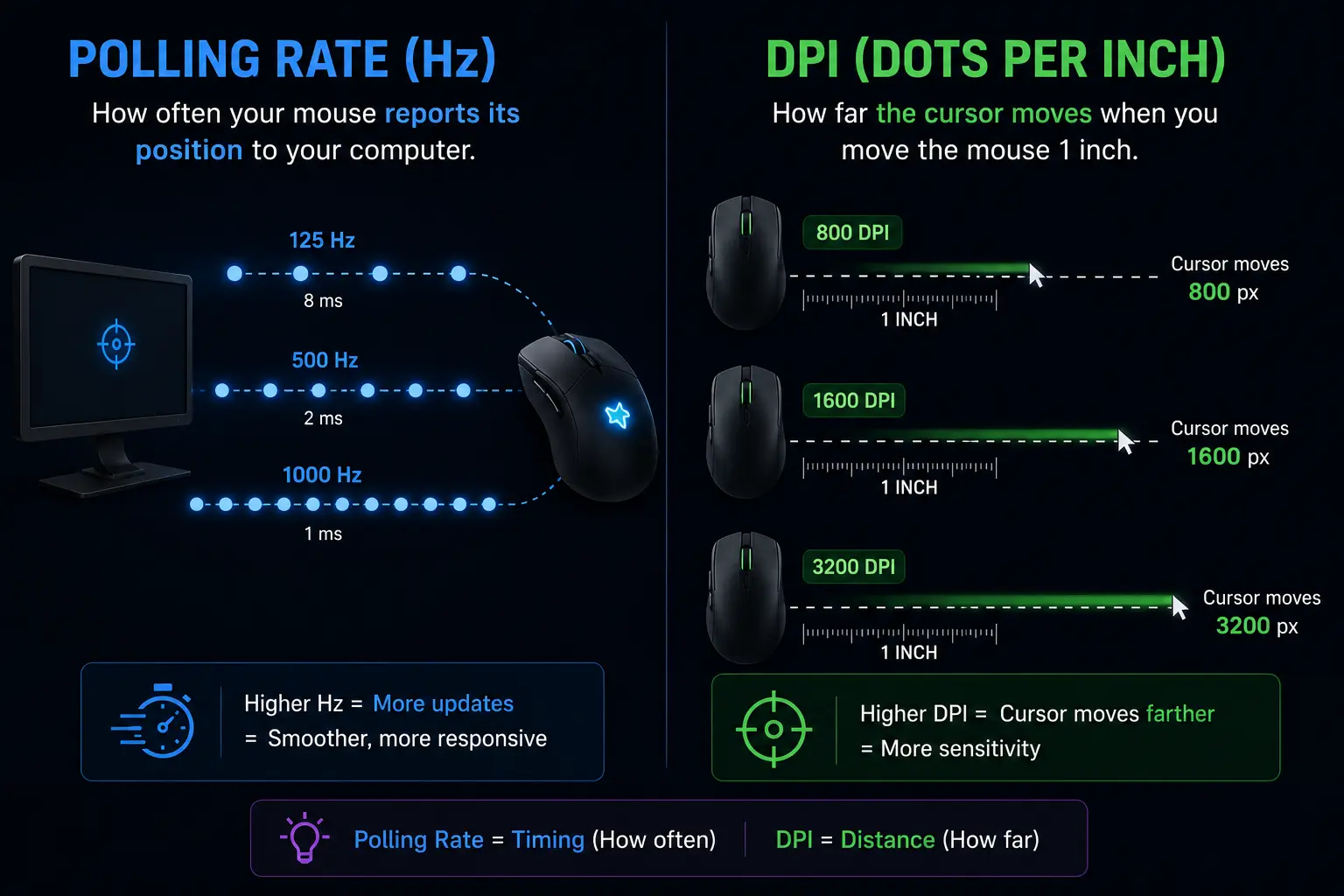
Polling Rate (Hz)
How often your mouse reports its position to your computer. Affects responsiveness and input lag.
DPI (Dots Per Inch)
How far the cursor moves when you physically move the mouse 1 inch. Affects sensitivity and cursor speed.
Example Scenario:
A 1000Hz mouse with 800 DPI sends position data 1,000 times per second, and each physical inch of mouse movement translates to 800 pixels of cursor movement. Both settings control different aspects: polling rate is about timing, and DPI is about distance.
Is a Higher Polling Rate Always Better?
While higher polling rates offer clear benefits, there are important trade-offs to keep in mind
Wireless Battery Life
Higher polling rates consume substantially more power due to constant radio transmission. Running a wireless mouse at 4000Hz or 8000Hz will drain the battery up to 4x faster than 1000Hz.
Diminishing Returns
The leap from 125Hz (8ms) to 1000Hz (1ms) saves 7 full milliseconds. The jump from 1000Hz (1ms) to 8000Hz (0.125ms) saves only 0.875ms—barely noticeable without an ultra-high Hz monitor.
System & Display Requirements
Processing 1,000 to 8,000 packets per second requires balanced hardware. To genuinely feel the fluidity of high polling rates, your display refresh rate must also be properly calibrated. Check your monitor’s true frequency with our Refresh Rate Test.
How to Change Your Mouse Polling Rate
Choose the configuration method that matches your mouse type
Method 1: Gaming Mice with Software
Logitech G HUBRazer Synapse Corsair iCUESteelSeries GG
Most branded gaming mice (Logitech, Razer, Corsair, SteelSeries) include proprietary software:
- Download App:- Get your manufacturer’s app (G HUB, Synapse, iCUE)
- Locate Settings:- Open the software and locate your mouse settings.
- Find Polling Rate:- Find “Polling Rate” or “Report Rate” options
- Select Hz:- Select your desired Hz (125/250/500/1000)
- Apply & Test:- Click Apply and test with our tool above
Method 2: Mice with Hardware Buttons
Plug & Play: Some gaming mice feature dedicated polling rate buttons on the device itself. Press the button to cycle through settings:
125Hz → 500Hz → 1000Hz
Check your mouse manual or underside switch for button location.
Method 3: Non-Gaming Mice
Fixed 125Hz:- Basic office mice typically don’t support polling rate adjustments and remain fixed at 125Hz. You’ll need to upgrade to a gaming mouse for higher rates.
Why Your Test Results May Vary
If your test results fluctuate or read lower than rated specifications, consider these technical factors
Browser Limitations
Web browsers manage event queues differently based on hardware acceleration and OS display compositor throttling.
USB Port Quality
Connecting through unpowered hubs or front-panel headers can add latency to the USB HID controller. Always connect directly to motherboard rear USB ports.
System Load
Heavy background applications or high CPU utilization can interrupt browser event loops and cause packet clustering.
Movement Speed
Mice only report when motion occurs. If you move slowly or stop, the reported frequency drops. Fast, continuous circular sweeps yield the true peak.
Frequently Asked Questions
Got questions about mouse polling rates? We have answers.
Q. What is a good pooling rate for gaming?
For competitive FPS gaming, 1000Hz is the gold standard. Casual gamers will find 500Hz perfectly adequate. Professional esports players sometimes use 2000Hz or 4000Hz with premium high-refresh displays.
Q. Does poling rate affect mouse sensitivity?
No. Polling rate controls how often position updates happen; DPI controls how much the cursor moves per inch. They are completely independent settings that both contribute to your overall mouse feel.
Q. Is 125HZ Polling rate bad?
Not “bad,” just basic. 125Hz works fine for office tasks, web browsing, and general productivity. For fast-paced gaming, you will notice slight cursor latency compared to 500Hz or 1000Hz mice.
Q. Can high polling rate cause Lag or FPS drops?
On very old or weak CPUs, yes. Higher Hz requires more processing power. However, any modern CPU (made after 2015) easily handles 1000Hz without noticeable performance impact.
Q. Should i use 8000HZ polling rate?
Only if you have a 240Hz+ high-refresh monitor (verify your screen with our Refresh Rate Test), a powerful high-end CPU, and compete at an esports level. For 99% of gamers, 1000Hz provides virtually identical real-world performance at much lower system resource cost.
Q. Does polling rate affect wireless battery life?
Yes, significantly. Higher Hz means more frequent radio transmissions, draining battery cells faster. Many wireless gaming mice default to 500Hz or 1000Hz to maintain the optimal balance between performance and longevity.